Vivarune™
Vivarune™ FocusBeam LED Monitor Light Bar – Stepless Dimming, Adjustable Color Temperature, Low-Blue-Light Illumination & Flexible Screen-Mount Design
Vivarune™ FocusBeam LED Monitor Light Bar – Stepless Dimming, Adjustable Color Temperature, Low-Blue-Light Illumination & Flexible Screen-Mount Design
Couldn't load pickup availability
Light the Desk, Not the Screen
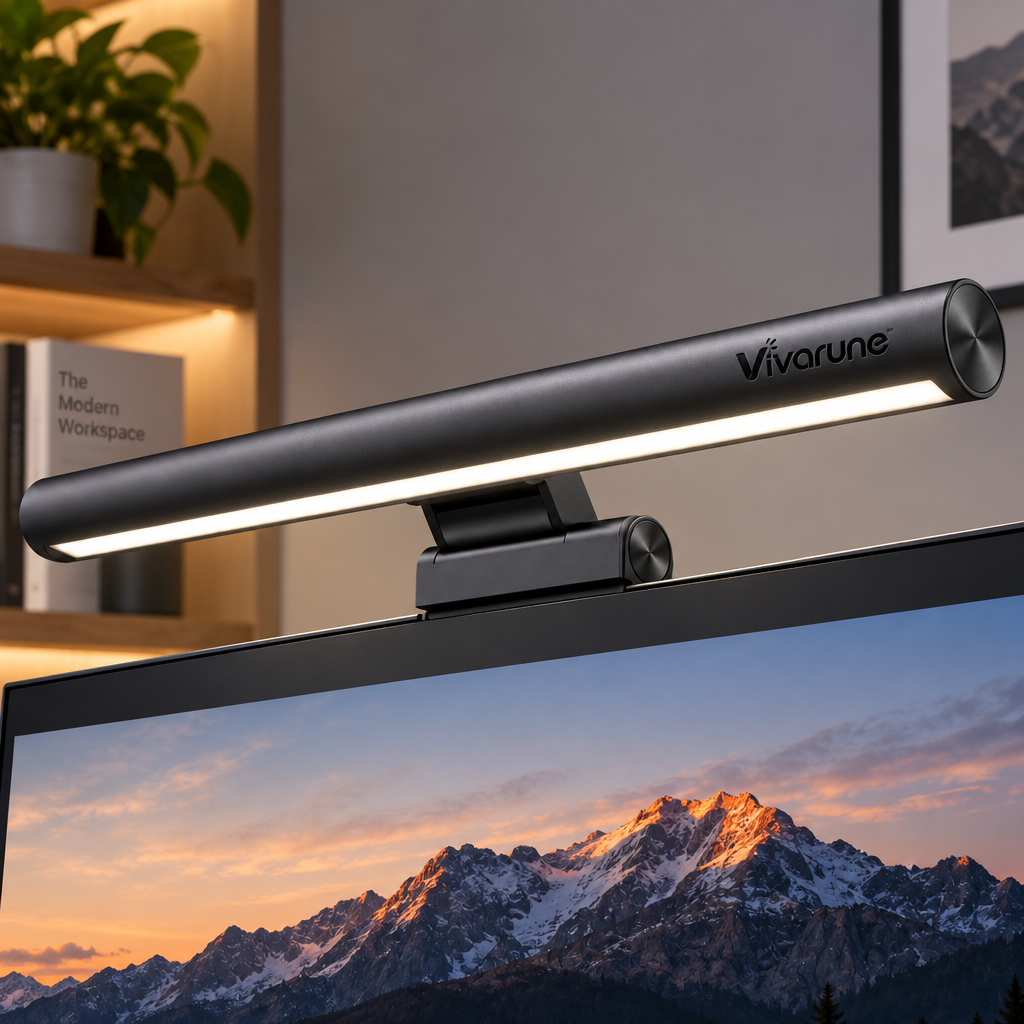
Create a cleaner and more comfortable workspace with the Vivarune™ FocusBeam LED Monitor Light Bar, a streamlined lighting solution designed for modern computer desks.
Mounted directly above your monitor, FocusBeam provides targeted illumination across the keyboard, documents, notebooks, and surrounding desktop while helping keep the light source out of the way. Instead of occupying valuable desk space like a traditional lamp, it makes use of the space already above your screen.
With stepless brightness adjustment, selectable color temperature, low-blue-light-oriented illumination, and an adjustable lighting angle, it can adapt to different parts of your day—from focused daytime work to softer evening reading.
Whether you're working from home, studying, editing content, gaming, or simply trying to keep your desk better organized, FocusBeam adds useful illumination without adding another bulky accessory.
🖥️ Made for the Space Above Your Monitor
A traditional desk lamp takes up surface area that could be used for your keyboard, notebook, speakers, or other essentials.
FocusBeam attaches directly to the monitor area, keeping the desktop open while positioning illumination exactly where it's most useful.
This makes it especially practical for:
- 💻 Home-office workstations
- 📚 Study desks
- 🎮 Gaming setups
- ✍️ Writing and note-taking
- 🎨 Creative work
- 🖥️ Multi-accessory desktop setups
- 🏠 Small apartments and compact offices
The result is a more organized lighting setup with less visual clutter.
💡 Wide Lighting Across Your Work Surface
The elongated LED light bar is designed to distribute illumination across a broader portion of the desk.
Instead of creating one concentrated bright spot, the horizontal format helps illuminate areas such as:
⌨️ Keyboards
📖 Books
📝 Documents
✏️ Notebooks
🖱️ Mouse areas
🎨 Drawing surfaces
This makes it easier to build one consistent workspace around your monitor.
🎚️ Stepless Dimming for More Precise Control
Lighting needs change throughout the day.
Use brighter illumination when reviewing documents or working on detailed tasks, then reduce the intensity when the room becomes darker.
The stepless dimming function provides more flexibility than a small number of fixed brightness presets, allowing you to fine-tune the light according to your workspace and preference.
Brighter when you need focus.
Softer when you want a calmer desk.
🌤️ Adjustable Color Temperature
Different lighting tones can create noticeably different environments.
FocusBeam lets you adjust the color temperature so the workspace can better match the time of day or type of task.
Warm Tone
A softer appearance for evening use, casual reading, or a more relaxed environment.
Balanced Tone
A neutral everyday option for general computer work and desk activities.
Cool Tone
A clearer, crisper look for studying, writing, or detail-focused tasks.
One light can therefore serve several different routines without changing the rest of your setup.
🟦 【PRODUCT CONTENT IMAGE 01 — WORKSPACE LIGHTING & COLOR TEMPERATURE】
AI Image Generation Direction
Create a premium Amazon-style product infographic featuring the exact Vivarune™ monitor light bar shown in the reference image.
Mount the light bar on top of a modern thin-bezel monitor in a realistic American home-office setup.
The desk should include:
- Modern monitor
- Keyboard
- Mouse
- Notebook
- Coffee cup or small desk accessory
- Minimal plant or décor
Keep the scene clean and sophisticated.
Main Headline:
LIGHT THAT WORKS AROUND YOUR SCREEN
Supporting Line:
More useful desk illumination without sacrificing workspace.
Show 3 Lighting Environments:
WARM
Soft amber-toned illumination
Comfortable for relaxed evening use.
NATURAL
Balanced neutral illumination
Versatile lighting for everyday tasks.
COOL
Clearer cool-toned illumination
Ideal for focused desk activities.
Feature Callouts:
🎚️ Stepless Dimming
Fine-tune brightness throughout the day.
🌤️ Adjustable Color Temperature
Choose the lighting tone that fits the moment.
💡 Wide Desktop Coverage
Illuminate the area in front of your monitor.
🖥️ Space-Saving Monitor Mount
Keep more of your desk available.
Visual Style:
Use warm beige, soft charcoal, muted gray, cream, and subtle metallic accents.
Keep the product housing, cylindrical bar shape, end caps, adjustable support, and Vivarune™ branding consistent with the reference image.
Avoid exaggerated futuristic graphics. The image should look realistic, premium, and suitable for the U.S. electronics market.
👁️ A More Thoughtful Approach to Desk Lighting
Monitor lighting works differently from a conventional lamp.
By positioning the light above the display, FocusBeam helps direct illumination toward the desk area rather than requiring a large lamp to sit beside the screen.
The light bar design also emphasizes a softer, more controlled desktop environment, making it useful for people who spend long periods reading documents, typing, studying, or switching between digital and physical tasks.
Its low-blue-light-oriented illumination provides another layer of comfort-focused design for everyday desk use.
↕️ Adjust the Angle to Fit Your Setup
Every monitor, desk height, and seating position is slightly different.
That's why the lighting angle matters.
The adjustable bar and flexible mounting structure allow you to reposition the illumination so it lands more naturally on the desk surface.
Tilt it forward for more direct desktop lighting.
Shift the angle when your monitor position changes.
Fine-tune the setup when moving between reading, typing, or other tasks.
A small adjustment can make the light feel much more intentional.
📐 Flexible Mount, Cleaner Desktop
The monitor-mounted structure combines practicality with a minimal footprint.
Rather than adding another object to the left or right side of the desk, FocusBeam integrates with the monitor itself.
That makes it especially valuable for:
🏠 Compact home offices
🎓 Dorm-room desks
🖥️ Minimalist workstations
🎮 Gaming desks
💼 Professional desktop setups
The result is a more centered, balanced lighting arrangement.
🟪 【PRODUCT CONTENT IMAGE 02 — ADJUSTABLE ANGLE & DAILY USE】
AI Image Generation Direction
Create a premium multi-panel product infographic showing the same Vivarune™ FocusBeam LED Monitor Light Bar in several practical scenarios.
Use a bright, realistic U.S. home-office aesthetic.
Panel 1 — WORK
Show the light bar mounted above a monitor while illuminating a keyboard and notebook.
CLEARER DESK LIGHTING
Keep important work surfaces easier to see.
Panel 2 — READ
Show an open book or document positioned below the monitor.
LIGHT WHERE YOU NEED IT
Direct illumination toward reading and writing areas.
Panel 3 — ADJUST
Use a close side view of the product with subtle directional arrows showing the bar tilting through different positions.
FIND YOUR ANGLE
Adjust the light direction to suit your setup.
Panel 4 — SAVE SPACE
Show a clean top-down or angled desk image with no traditional lamp occupying the desk surface.
MORE ROOM TO WORK
Monitor-mounted lighting helps preserve valuable desktop space.
Bottom Feature Strip:
Stepless Dimming • Adjustable Color Temperature • Flexible Angle • Monitor-Mounted Design
Visual Style:
Use:
- Warm off-white
- Soft taupe
- Graphite
- Light silver
- Warm neutral illumination
Avoid neon RGB colors because this product belongs to the functional task-lighting side of the Vivarune™ collection.
The design should feel distinctly different from the RGB ambient-light products.
🏠 A Better Fit for Modern Desks
More people now use their desks for several purposes in the same day.
A workstation may become:
💼 An office in the morning
📚 A study space in the afternoon
🎮 A gaming setup in the evening
📖 A reading area at night
FocusBeam is designed around that kind of flexible desktop routine.
Instead of dedicating desk space to a traditional lamp, the lighting remains integrated with the monitor and ready whenever you need it.
✍️ Helpful for Screen + Paper Workflows
Computer work doesn't always stay on the screen.
Maybe you're comparing a spreadsheet with a printed document.
Taking notes during a video call.
Reading a textbook while researching online.
Sketching ideas while referencing something on the monitor.
FocusBeam helps illuminate the physical workspace directly below the display, making it especially useful for people who regularly move between digital and paper-based tasks.
🎮 Functional Lighting Without Turning Everything Into RGB
Not every gaming or computer setup needs colorful lighting.
For users who prefer a cleaner, more mature appearance, the slim dark housing and warm-to-cool adjustable illumination can complement a gaming or workstation setup without dominating it.
Pair it naturally with:
✔ Black monitors
✔ Mechanical keyboards
✔ Gray or metal accessories
✔ Minimal speakers
✔ Dark wood desks
✔ White or neutral workspaces
The understated design allows the monitor and desk to remain the visual focus.
🧑💻 Designed for Long Desk Sessions
When your desk is where you work, study, communicate, and relax, the lighting needs to be versatile.
FocusBeam allows you to make small adjustments throughout the day instead of relying on one fixed lighting condition.
Morning
Choose brighter, balanced illumination for starting the workday.
Afternoon
Increase or fine-tune brightness for detailed tasks.
Evening
Move toward a warmer tone and lower intensity.
Night
Adjust the angle and brightness to create a more subdued workspace.
One lighting tool, multiple parts of your routine.
⭐ Key Features at a Glance
💡 Wide LED Light Bar
Provides broad illumination across the working area in front of your display.
🎚️ Stepless Brightness Adjustment
Fine-tune light intensity instead of being restricted to only a few levels.
🌤️ Adjustable Color Temperature
Move between warmer and cooler lighting environments.
👁️ Low-Blue-Light-Oriented Illumination
Designed with everyday visual comfort in mind.
🔄 Flexible Angle Adjustment
Reposition the light to better match your desk and monitor configuration.
🖥️ Monitor-Mounted Design
Makes use of space above the display rather than consuming desktop surface area.
✨ Clean Modern Appearance
A slim dark body complements contemporary monitors and computer accessories.
📚 Great for Work, Study and Creative Tasks
FocusBeam works naturally across different users and environments.
For Remote Workers
Keep documents, keyboards, and notebooks illuminated during daily desk work.
For Students
Create a focused desk area for studying, reading, and assignments.
For Writers
Add useful illumination to notebooks and printed material positioned below the monitor.
For Designers & Creators
Light up sketchbooks, reference materials, and nearby tools.
For Gamers
Add practical desktop illumination without introducing another full-size lamp.
For Minimalists
Reduce the number of objects occupying the desk.
🎁 A Smart Upgrade for a Better Desk Setup
Because it doesn't depend on a particular décor style, FocusBeam makes a practical gift for people who spend a lot of time at a computer.
Suitable for:
💻 Remote workers
🎓 Students
🖥️ Desktop PC users
🎮 Gamers
✍️ Writers
🎨 Creators
🏠 Home-office users
A useful choice for birthdays, back-to-school season, home-office upgrades, new workspaces, or holiday gifting.
🟩 【AFTER-SALES GUARANTEE IMAGE — CUSTOMER SUPPORT】
AI Image Generation Direction
Create a clean customer-care graphic featuring the Vivarune™ FocusBeam LED Monitor Light Bar mounted on a modern monitor.
Use a soft warm-gray, beige, and charcoal visual theme that matches the product rather than using RGB colors.
The product should occupy approximately 35–40% of the image, leaving the remaining area for support information.
Main Headline:
SUPPORT FOR THE SETUP BEYOND THE SCREEN
Supporting Text:
We want your Vivarune™ product experience to remain straightforward after delivery. If you have questions about your order, product, delivery, or an eligible return, our customer support team is available to assist.
Suggested Support Blocks:
💬 Product Assistance
Questions about setup or everyday use? Contact our customer support team.
📦 Order Support
Need help regarding your order or delivery? We're ready to assist.
↩️ Return & Refund Assistance
Eligible requests are handled according to our published store policies.
📧 Customer Care
Reach out whenever you need help with your purchase.
Bottom Statement:
Vivarune™ — Better Light for the Way You Work.
Do not add unsupported claims such as lifetime warranty, free lifetime replacement, guaranteed 24-hour support, or a specific warranty duration unless those terms are actually stated in the store's official policies.
Make Your Monitor Work Harder for Your Desk
A better workspace doesn't always require another piece of furniture or a complete redesign.
Sometimes, moving the light to the right place makes the biggest difference.
The Vivarune™ FocusBeam LED Monitor Light Bar combines adjustable brightness, selectable color temperature, flexible positioning, and a monitor-mounted form into one practical desktop lighting solution.
It frees up desk space.
It puts light closer to the area where you actually work.
And it lets you adjust the environment as your day changes.
Less clutter above the desk. More useful light across it.
Share